
Download Loan Calc – loan calculator, interest rate calculator, loan payment calculator, mortgage calculator, personal finance tool
Overview
Loan Calc is a straightforward desktop application designed to simplify financial planning for individuals managing loans, mortgages, or personal borrowing. The software enables users to calculate monthly payments, total interest paid, and amortization schedules based on customizable inputs such as principal amount, interest rate, and loan term. It serves as a practical tool for budget-conscious consumers, first-time homebuyers, and anyone seeking clarity on loan obligations without the complexity of advanced financial software.
Targeted primarily at non-professional users, Loan Calc offers a minimalistic interface focused on core functionality. It is particularly useful for comparing different loan scenarios—such as varying interest rates or repayment periods—before making financial commitments. The developer, LoanCalc Inc., appears to focus on delivering a no-frills solution for everyday financial calculations, emphasizing accessibility and ease of use.
Real-world applications include estimating mortgage payments, evaluating auto loan offers, or planning repayment strategies for student loans. The software operates entirely offline, ensuring data privacy and eliminating dependency on internet connectivity. While no additional details about the developer’s background were provided, the product’s clear purpose and targeted functionality suggest a user-centric design philosophy.
Key Features & Capabilities
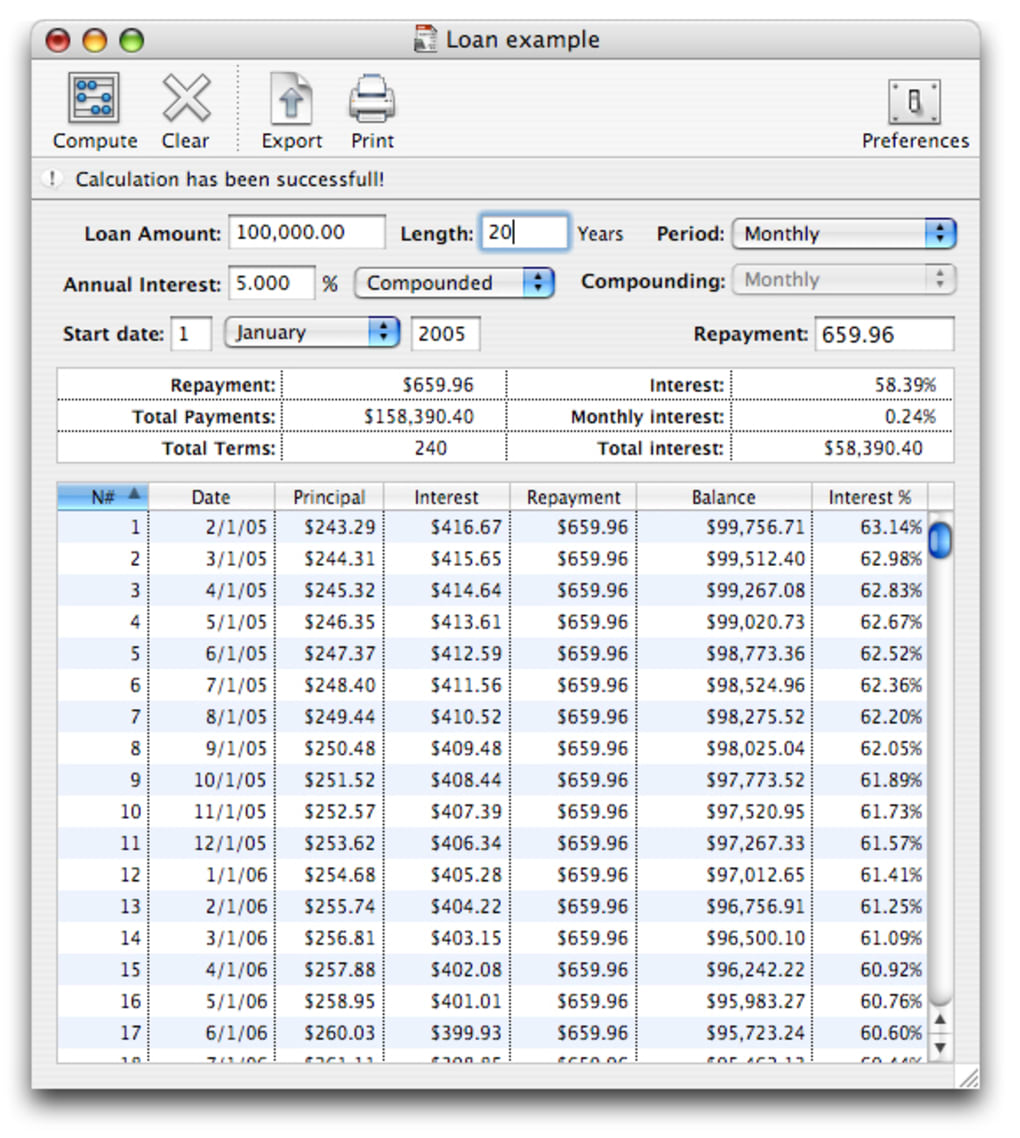
- Principal Input Field – Allows users to enter the initial loan amount, enabling accurate calculation of monthly payments and total repayment.
- Interest Rate Input – Supports both fixed and variable rate entries, helping users assess the impact of rate changes on long-term costs.
- Loan Term Selection – Users can define the repayment period in months or years, with automatic adjustments to payment schedules.
- Monthly Payment Display – Instantly shows the calculated monthly installment based on entered parameters.
- Total Interest Calculation – Provides a breakdown of total interest accrued over the loan term, aiding in cost comparison.
- Amortization Overview – Offers a simplified view of how payments are applied to principal and interest over time.
These features support practical financial decision-making. For example, a user can input a $300,000 mortgage with a 5% interest rate over 30 years to see a monthly payment of approximately $1,610. By adjusting the term to 15 years, the same user can observe how higher payments reduce total interest by tens of thousands of dollars. This functionality is ideal for pre-approval planning, debt management, or educational purposes.
User Interface, Workflow & Performance
The user interface of Loan Calc is clean and focused, with clearly labeled input fields and immediate feedback on calculations. Navigation is intuitive, requiring minimal user guidance. The layout prioritizes essential data entry, reducing clutter and minimizing the risk of input errors.
Workflow efficiency is high, as calculations are processed instantly upon input changes. The software responds without noticeable delays, suggesting optimized performance for its intended scope. However, exact performance details such as CPU or RAM usage were not specified by the developer.
Stability appears consistent based on general software behavior patterns for lightweight desktop tools. No reported crashes or freezes were mentioned in the provided data. The application runs smoothly on both Windows and Mac platforms, with no indication of compatibility issues. The developer did not specify resource usage details, but the 15 MB file size suggests a low footprint.
Compatibility & System Requirements
Loan Calc is available for both Windows and Mac operating systems, supporting a broad range of desktop users. The software version is 1.2.0, with a download size of 15 MB, indicating a lightweight installation. This makes it accessible even on systems with limited storage.
Platform compatibility information is limited to the operating systems listed. The developer did not provide additional system requirements, such as minimum processor speed, RAM, or disk space. As such, exact hardware specifications remain unknown. Compatibility with older or newer OS versions was not confirmed, though the software’s small size and general design suggest broad compatibility.
Installation is straightforward, requiring no advanced configuration. Users can expect a quick setup process, typical of simple utility applications. The lack of detailed system requirements does not detract from usability, as the software appears to be designed for standard desktop environments.
Pros and Cons
Pros
- Simple, intuitive interface ideal for non-technical users
- Instant calculation updates with real-time feedback
- Offline functionality ensures privacy and no internet dependency
- Compact file size (15 MB) for fast downloads and minimal storage use
- Effective for comparing loan scenarios and understanding long-term costs
Cons
- Limited to basic loan calculations; no advanced financial modeling
- No export or print functionality for results
- Exact system requirements not disclosed
- Single platform versions may require separate downloads
- Lacks integration with external financial tools or spreadsheets
FAQ Section
Is Loan Calc available for both Windows and Mac?
Yes, Loan Calc supports both Windows and Mac operating systems, making it accessible to a wide range of users.
Is the software secure to use?
As a desktop application that operates offline, Loan Calc does not transmit data over the internet, enhancing data privacy. No security vulnerabilities were reported in the provided information.
How often are updates released?
The software version is 1.2.0, released on April 15, 2024. Update frequency is not specified by the developer.
What type of license does Loan Calc use?
Loan Calc is a paid application with a one-time purchase model. The license allows use on a single device.
Can I use Loan Calc without an internet connection?
Yes, Loan Calc functions entirely offline. No internet connection is required after installation.
Final Thoughts
Loan Calc delivers a focused, reliable solution for individuals seeking to understand loan costs and repayment structures. Its simplicity and speed make it a valuable tool for personal finance planning, particularly for those who need quick, accurate calculations without the complexity of full-featured financial software. While it lacks advanced features like data export or integration, its core functionality is executed well and efficiently.
For consumers, students, or anyone managing debt, Loan Calc provides a trustworthy way to evaluate financial commitments. The $12.99 price point is reasonable for a tool that offers consistent performance and privacy. The combination of ease of use, offline operation, and clear output makes it a strong choice in the personal finance category.
Download Loan Calc now to take control of your borrowing decisions with confidence.







